Introduction to Wave v0.1.0-pre-beta: Add Import and UTF-8 Support
Hello! I'm LunaStev, the developer of Wave. We are very pleased to introduce Wave 'v0.1.0-pre-beta' — This update supports the import function and UTF-8, allowing you to output...
Wave Foundation
Introduction to Wave v0.1.0-pre-beta: Add Import and UTF-8 Support
Hello! I'm LunaStev, the developer of Wave.
We are very pleased to introduce Wave 'v0.1.0-pre-beta' — This update supports the import function and UTF-8, allowing you to output other characters, unlike previous versions that only supported ASCII.
✅ Added Features
📦 Local File Import Support
-
Introduced
import("...");statement in Wave syntax. -
Supports importing
.wavesource files relative to the current file's directory. -
Prevents duplicate imports automatically using an internal
HashSet. -
Imported files are parsed, converted to AST, and merged into the main program at compile time.
-
Enables modular project structure by allowing multi-file composition.
🔧 Bug Fixes
🐞 UTF-8 Handling in Lexer
-
Fixed tokenizer crash on non-ASCII characters.
-
Lexer now correctly processes UTF-8 multi-byte characters, enabling support for Korean and other languages in source code.
🐞 Underscore (_) Support in Identifiers
-
Variable and function names can now contain underscores.
-
Lexer now treats identifiers like
my_varorsome_functionas valid.
Showcase

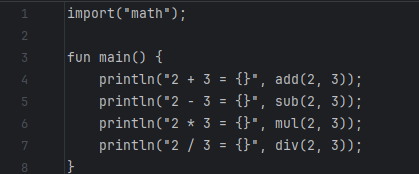

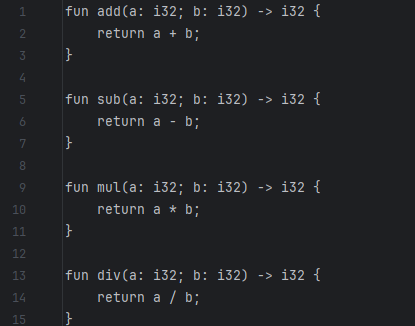



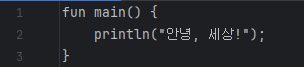


Thank you for using Wave! Stay tuned for future updates and enhancements.
Installation Guide
For Linux:
-
Download and Extract:
-
Download the
wave-v0.1.0-pre-beta-x86_64-linux-gnu.tar.gzfile from the official source. -
Use the wget command:
wget https://github.com/LunaStev/Wave/releases/download/v0.1.0-pre-beta/wave-v0.1.0-pre-beta-x86_64-linux-gnu.tar.gz -
Extract the archive:
sudo tar -xvzf wave-v0.1.0-pre-beta-x86_64-linux-gnu.tar.gz -C /usr/local/bin
-
-
Setting up LLVMs
-
Open a terminal and type:
sudo apt-get update
sudo apt-get install llvm-14 llvm-14-dev clang-14 libclang-14-dev lld-14 clang
sudo ln -s /usr/lib/llvm-14/lib/libLLVM-14.so /usr/lib/libllvm-14.so
export LLVM_SYS_140_PREFIX=/usr/lib/llvm-14
source ~/.bashrc
-
-
Verify Installation:
-
Open a terminal and type:
wavec --version -
If the version number displays, the installation was successful.
-
Contributor
@LunaStev | 🇰🇷